Moneysite — Withdraw
Overview
Halaman Withdraw (Penarikan) adalah tempat dimana pemain dapat melakukan transaksi pencairan balance akun ke rekening bank mereka. Halaman ini menampilkan:
- Saldo koin pemain saat ini
- Informasi rekening bank penerima (untuk transfer)
- Form pengajuan penarikan (opsional, tergantung status akun)
- Riwayat penarikan (withdrawal history) dengan status setiap transaksi
Screenshot
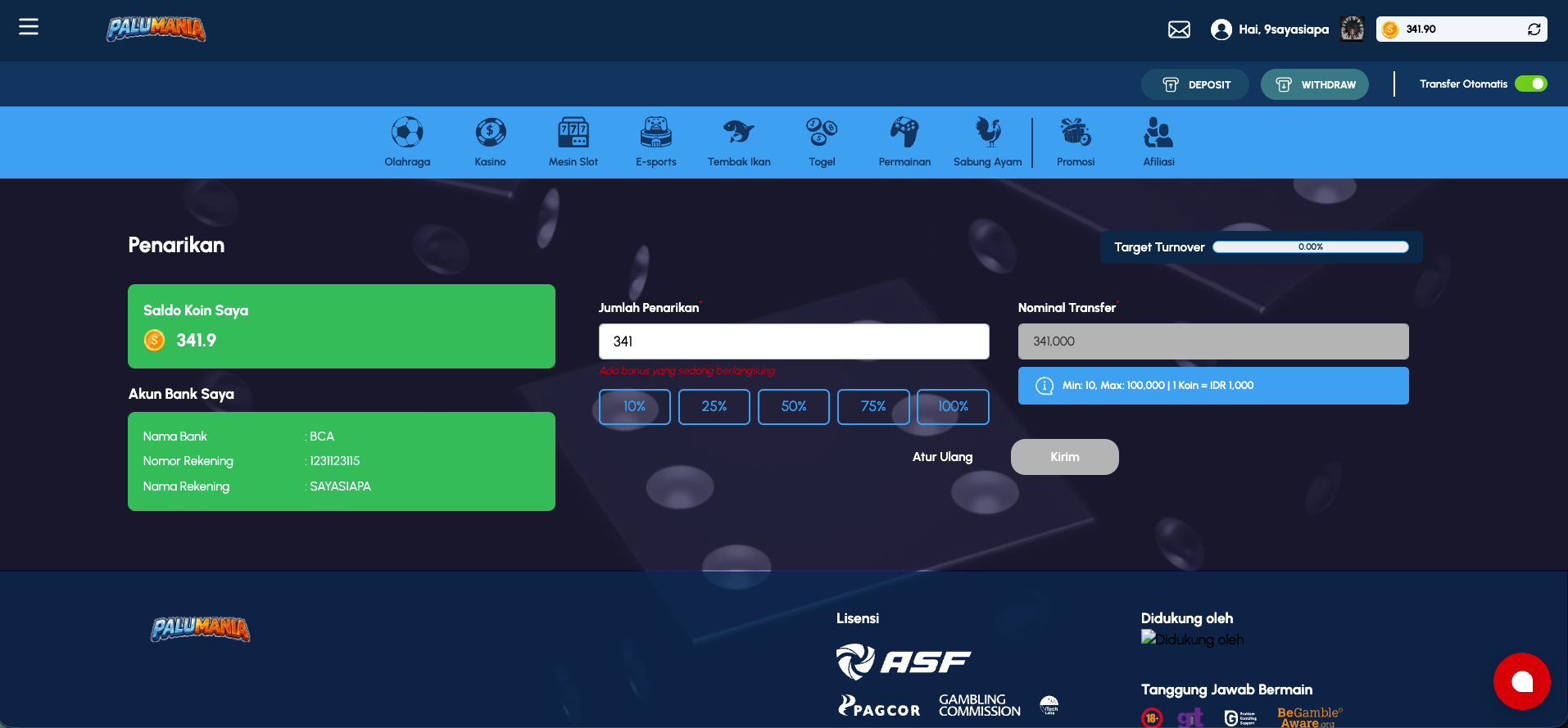 Withdraw page showing account balance, bank details, and withdrawal history with transaction statuses
Access
- URL:
/withdraw - Role required: Authenticated player with verified bank account
- Navigation path: Click "Withdraw" button in action bar (always visible at top)
- Direct link: Accessible from any page in the platform
Page Layout
Header Area
Sama seperti home page - tetap menampilkan header dengan account info, action buttons, dan game category navigation.
Main Content Area
Section 1: Page Title
- Title: "Penarikan" (Withdrawal)
- Position: Below header
Section 2: Account Information (Summary)
Informasi akun pemain yang relevan dengan withdrawal.
| Element | Type | Description |
|---|---|---|
| Saldo Koin Saya | Display | Current coin balance (e.g. "2,500.74") |
| Coin Icon | Image | Visual icon untuk balance |
| Akun Bank Saya | Label | "My Bank Account" heading |
| Nama Bank | Display | Bank name (e.g. "BCA") |
| Nomor Rekening | Display | Bank account number (e.g. "1234567788") |
| Nama Rekening | Display | Account holder name (e.g. "TESTAFFBHTESTAF") |
Notes:
- Bank info adalah static display (read-only)
- Data diambil dari profile/account settings
- User harus verify bank account terlebih dahulu di Profile page
Section 3: Withdrawal Form (If Applicable)
Form untuk mengajukan penarikan dana. Catatan: Sesuai dengan test suite, form ini mungkin tidak selalu visible tergantung status akun.
| Field | Type | ID | Required | Description |
|-------|------|----|-----------|-----------||
| Withdraw Amount | Number input | withdraw-amount | ✅ Required | Masukkan jumlah koin yang ingin ditarik |
| Withdraw Real Amount | Text display (readonly) | withdraw-real-amount | - | Menampilkan jumlah dalam IDR (auto-calculated) |
Calculation Logic:
- Formula:
Nominal Koin × 1,000 = Nominal Transfer IDR - Contoh: 50 koin = IDR 50,000
- Placeholder menampilkan format: "50,000"
Additional Elements:
- Coin Balance Popover Button:
[id^="headlessui-popover-button-"]- untuk menampilkan available balance - Kirim Button: Submit pengajuan withdrawal
Section 4: Withdrawal History
Riwayat penarikan pemain yang telah dibuat, ditampilkan sebagai daftar kartu/record.
Each Withdrawal Record Contains:
| Field | Label | Type | Description |
|---|---|---|---|
| Destination Bank | Tujuan | Badge + Text | Bank icon dan nama bank penerima (e.g. BCA) |
| Account Number | Nomor | Display | Bank account number, formatted (e.g. 123-4567-788) |
| Account Name | Nama | Display | Account holder name (e.g. TESTAFFBHTESTAF) |
| Status | Status | Badge | Current status of withdrawal |
| Date | Waktu | Display | Date dan time of withdrawal request (e.g. 25-11-2025 09:36:40) |
| Transfer Amount | Total penarikan | Display | Amount in IDR (e.g. IDR1,000,000) |
| Coin Amount | Nominal Koin | Display | Amount in coins (e.g. 1,000) |
Withdrawal Statuses
| Status | Label (Indonesian) | Description | Aktif | User Action Possible |
|---|---|---|---|---|
| DIMINTA | DIMINTA | Requested - Waiting for admin approval | 🟡 Pending | May be canceled (depends on system) |
| PENDING | PENDING | Processing - In queue for transfer | 🟡 Pending | Waiting for completion |
| DISETUJUI | DISETUJUI | Approved - Ready to process | 🟡 Pending | Waiting for bank |
| DIKIRIM | DIKIRIM | Sent - Transfer in progress | 🟡 Processing | Waiting for bank confirmation |
| SELESAI | SELESAI | Completed - Successfully transferred | ✅ Done | Transaction complete |
| DIHENTIKAN | DIHENTIKAN | Cancelled/Stopped - Withdrawn or failed | ❌ Failed | Transaction cancelled |
| DITOLAK | DITOLAK | Rejected - Withdrawal denied | ❌ Failed | Admin rejected |
Features
1. View Account & Coin Balance
Status: Display mode (read-only)
Displayed Information:
- Current coin balance at top
- Bank account details (name, account number, account holder)
- These are pre-verified from player profile
2. Submit Withdrawal Request
Status: Form submission
User Flow:
- View withdrawal page
- Current balance displayed
- Verify bank information is correct
- Enter amount in coins in
withdraw-amountfield - System auto-calculates IDR amount (shown in
withdraw-real-amountplaceholder) - OR click popover button to auto-fill with full balance
- Click "Kirim" button to submit
- Success toast: "Permintaan withdraw berhasil" (Withdrawal request successful)
- Withdrawal record appears at top of history list with status "DIMINTA"
Validation:
- Amount must be > 0
- Amount must not exceed available balance
- Amount must be >= minimum withdrawal (varies per system)
- Bank account must be verified
Processing:
- After submission, withdrawal enters approval queue
- Admin reviews and approves/ rejects
- Upon approval, funds transferred to bank account
- Transfer usually completes within 1-24 hours
- Player notified via in-game notification or email
3. View Withdrawal History
Status: Informational/Display
History Display:
- Shows all withdrawal requests (approved, processed, rejected, cancelled)
- Sorted by date (most recent first)
- Each record shows full details of the request/transaction
Information Shown:
- Destination bank and account details
- Amount requested (coins and IDR)
- Timestamp
- Current status
4. Fast Input / Auto-Fill Balance
Status: Convenience feature
Mechanism:
- Popover button shows current available balance
- Clicking might auto-fill the withdrawal amount with full balance
- User can then submit directly without manual entry
Test Reference:
- In tests, this is detected via
[id^="headlessui-popover-button-"] - Allows rapid "withdraw all" action
Withdrawal Limits & Rules
Amount Limits
| Limit | Value | Notes |
|---|---|---|
| Minimum | System-defined (typically IDR 10,000 / 10 coins) | May vary by account type |
| Maximum | System-defined | May vary by account type or daily limit |
| Daily Limit | System-defined | Total withdrawals per day |
| Monthly Limit | System-defined | Total withdrawals per month |
Account Requirements
- ✅ Bank account verified in profile
- ✅ Player account verified/validated
- ✅ No pending disputes or issues
- ✅ Account not flagged/suspended
Processing Rules
- Withdrawals processed during business hours (typically M-F 9AM-5PM)
- Weekends/holidays may delay processing
- Large amounts may require additional verification
- Minimum processing time: 1-2 hours (best case)
- Maximum processing time: 24-48 hours (typical)
UI Elements Reference
| Component | Type | Location | Description | Interactive |
|---|---|---|---|---|
| Page Title | Heading | Top | "Penarikan" | No |
| Saldo Koin Saya | Display | Account Info | Current balance with icon | Click to potentially open form |
| Akun Bank Saya | Heading | Account Info | "My Bank Account" section | No |
| Bank Details | Display | Account Info | Name, account number, account holder | No |
| Withdraw Amount Input | Number input | Form (optional) | Id: withdraw-amount | Type to enter amount |
| Withdraw Real Amount | Display (readonly) | Form (optional) | Id: withdraw-real-amount, shows IDR placeholder | Read-only |
| Balance Popover | Button | Form (optional) | Id starts with headlessui-popover-button- | Click to show/fill balance |
| Kirim Button | Button | Form footer | Submit withdrawal | Click to submit |
| Withdrawal Record | Card | History section | Each past withdrawal | Click for details (if expandable) |
| Record - Destination | Badge | Withdrawal record | Bank icon + name | Display |
| Record - Number | Text | Withdrawal record | Formatted account number | Display |
| Record - Name | Text | Withdrawal record | Account holder name | Display |
| Record - Status | Badge | Withdrawal record | Current status (colored) | Display |
| Record - Date | Text | Withdrawal record | Formatted date/time | Display |
| Record - Amount IDR | Text | Withdrawal record | Total withdrawal in IDR | Display |
| Record - Amount Coins | Text | Withdrawal record | Total withdrawal in coins | Display |
Validation Rules
Withdrawal Amount
| Rule | Error Message | Notes |
|---|---|---|
| Required | "Silakan masukkan nominal" | Amount is mandatory |
> 0 | "Nominal tidak boleh 0" | Must be greater than zero |
| Numeric only | "Nominal harus angka" | Only numbers allowed |
>= Min | "Nominal di bawah minimum" | Below system minimum |
<= Max | "Nominal melebihi maksimum" | Exceeds system maximum |
<= Available Balance | "Saldo tidak cukup" | Cannot exceed account balance |
Account/Verification
| Rule | Error Message | Notes |
|---|---|---|
| Bank verified | "Rekening bank belum diverifikasi" | Must verify in profile first |
| Account active | "Akun terkunci/suspend" | Account must be in good standing |
| No disputes | "Ada transaksi pending" | Cannot withdraw if pending issues |
Data Displayed
Withdrawal History
Source: User withdrawal transactions from API (e.g. /api/withdrawals or /api/player/withdrawals)
Data Points:
- Tujuan (Destination): Bank details
- Nomor (Number): Account number
- Nama (Name): Account holder name
- Status: Transaction status
- Waktu (Time): Timestamp
- Total penarikan: Amount in IDR
- Nominal Koin: Amount in coins
Order: Most recent first (descending by date) Refresh: Loads on page init, may auto-refresh periodically
Coin Balance
Source: Player wallet/balance API
Display: Large prominent number (e.g. 2,500.74) Refresh: Real-time or periodic update
Bank Account Info
Source: Player profile/KYC data
Display: Static fields showing verified bank details Refresh: Only updates when player changes bank account in profile
Behavior & Interactions
On Page Load
- Fetch player's current balance
- Fetch verified bank account info
- Fetch withdrawal history
- Display all information
Form Visibility
- Form may not appear if:
- Bank account not verified
- Account suspended/flagged
- KYC not complete
- Other account restrictions
On Form Submission
- User enters amount and clicks "Kirim"
- Client-side validation performed
- If valid, submit to API
/api/withdrawalsor similar - If valid on server:
- Withdrawal created with status "DIMINTA"
- Toast notification: "Permintaan withdraw berhasil"
- New record appears in history at top
- Form cleared or page refreshed
- If error:
- Error toast displayed
- Form retains data for correction
Status Updates
- Status may update in real-time or require page refresh
- DIMINTA → DISETUJUI → DIKIRIM → SELESAI (typical flow)
- Or DIMINTA → DITOLAK / DIHENTIKAN (error flow)
On Balance Click (Popover)
- Clicking balance-related popover shows current available amount
- May auto-fill withdrawal form with full balance
- Allows "withdraw all" quick action
Processing Timeline
Typical Withdrawal Timeline
| Step | Status | Time | Who |
|---|---|---|---|
| 1. Request submitted | DIMINTA | T+0 min | Player |
| 2. Admin review | DIMINTA | T+5-30 min | Admin |
| 3. Approved | DISETUJUI | T+30-60 min | Admin |
| 4. Bank transfer initiated | DIKIRIM | T+1-2 hours | System |
| 5. Bank processes | DIKIRIM | T+1-24 hours | Bank |
| 6. Funds received | SELESAI | T+24-48 hours | Bank/Player |
Fast Track (if available)
- Some accounts may have instant or faster withdrawals
- VIP players might have priority processing
Error Cases & Edge Cases
Insufficient Balance
- Error: "Saldo koin tidak cukup untuk penarikan"
- Solution: Deposit more funds or reduce withdrawal amount
Unverified Bank Account
- Error: "Rekening bank belum diverifikasi"
- Solution: Go to Profile > Verify bank account
Account Restricted
- Error: "Akun sementara dikunci, tidak bisa melakukan penarikan"
- Reasons: Dispute, fraud check, KYC review
- Solution: Contact support
Withdrawal Limit Reached
- Error: "Batas penarikan harian telah tercapai"
- Solution: Wait until next day or contact support
Duplicate/Rapid Requests
- System may prevent multiple withdrawals in short time
- Error: "Silakan tunggu sebelum melakukan penarikan lagi"
- Solution: Wait before submitting another request
Bank Account Mismatch
- If account details don't match verified account, transfer may fail
- Status becomes DIHENTIKAN (Stopped)
- Player must contact support or re-verify account
Processing Delay
- If withdrawal not completed within expected timeframe:
- Check status regularly
- Contact support for update
- Bank may have delays or issues
- Funds may be returned to account
Mobile Responsiveness
- Form fields and buttons optimized for touch
- Responsive layout adapts to small screens
- History records display in mobile-friendly card format
- Popover button works with touch input
- Bank details clearly readable on mobile
Security & Compliance
- Verified Bank Account Required: Prevents unauthorized transfers
- Amount Limits: Daily/monthly limits prevent abuse
- Transaction Logging: All withdrawals logged and auditable
- Approval Workflow: Admin review before processing
- TLS Encryption: Secure data transmission
- KYC/AML Compliance: Player verification required
- Fraud Prevention: System monitors for suspicious patterns
Related Pages & Features
- Profile:
/profile- Verify/manage bank account - Deposit:
/deposit- Add funds to account - Transaction History: May be available elsewhere to view all transactions
Notes
- Withdrawal Order: FIFO (First-in, First-out) - withdrawals processed in order received
- Processing Days: Typically Monday-Friday only (banks closed weekends/holidays)
- Bank Details: Must match verified account - mismatches cause transfers to fail
- Refund Policy: If withdrawal fails, funds returned to account within 1-3 business days
- Fees: No visible fees shown to player; may be deducted on backend
- Minimum Withdrawal: Typically 10 coins (IDR 10,000) but verify per platform
- Maximum Withdrawal: May be limited by account type, daily/monthly cap, or bank limits
- Conversion Rate: Fixed 1 Koin = IDR 1,000
- Language: Interface in Bahasa Indonesia
- Currency: All transactions in Indonesian Rupiah (IDR)
- Time Zone: Server may use specific time zone for daily limit resets
Test-Based Workflow Reference
Based on test suite (widhdraw.spec.ts):
Basic Withdraw Flow
1. Login as player with 'usrwd01' account
2. Navigate to /withdraw
3. Fill withdraw-amount input with coins (e.g. '50')
4. Verify withdraw-real-amount shows calculated IDR (e.g. '50,000')
5. Click Kirim button
6. Expect toast: 'Permintaan withdraw berhasil'
7. Stay on /withdraw page
8. Verify new record shows:
   - status: 'DIMINTA'
   - nominal_koin: '50'
   - total_penarikan: 'IDR 50,000'
Fast Fill Withdraw Flow
1. Login as player with 'usrwd02' account
2. Navigate to /withdraw
3. Get balance from popover button element
4. DO NOT manually fill amount
5. Click Kirim with pre-filled value
6. Expect toast: 'Permintaan withdraw berhasil'
7. Verify withdrawal created with full balance amount
This documents the expected behavior based on the test implementation.