Moneysite — Profile
Overview
Halaman Profile (Profil) adalah pusat manajemen informasi akun pemain. Halaman ini memungkinkan pemain untuk:
- Melihat dan mengelola informasi personal (nama, username, nomor telepon, email)
- Melihat dan mengelola informasi bank untuk withdrawal
- Memverifikasi data bank
- Mengubah kata sandi akun
- Melihat balance dompet utama (main wallet)
Access
- URL:
/profile - Role required: Authenticated player
- Navigation path: Header > Click on player name (e.g. "Hai, 200bonus")
- Direct link: Profile link di header
Screenshot
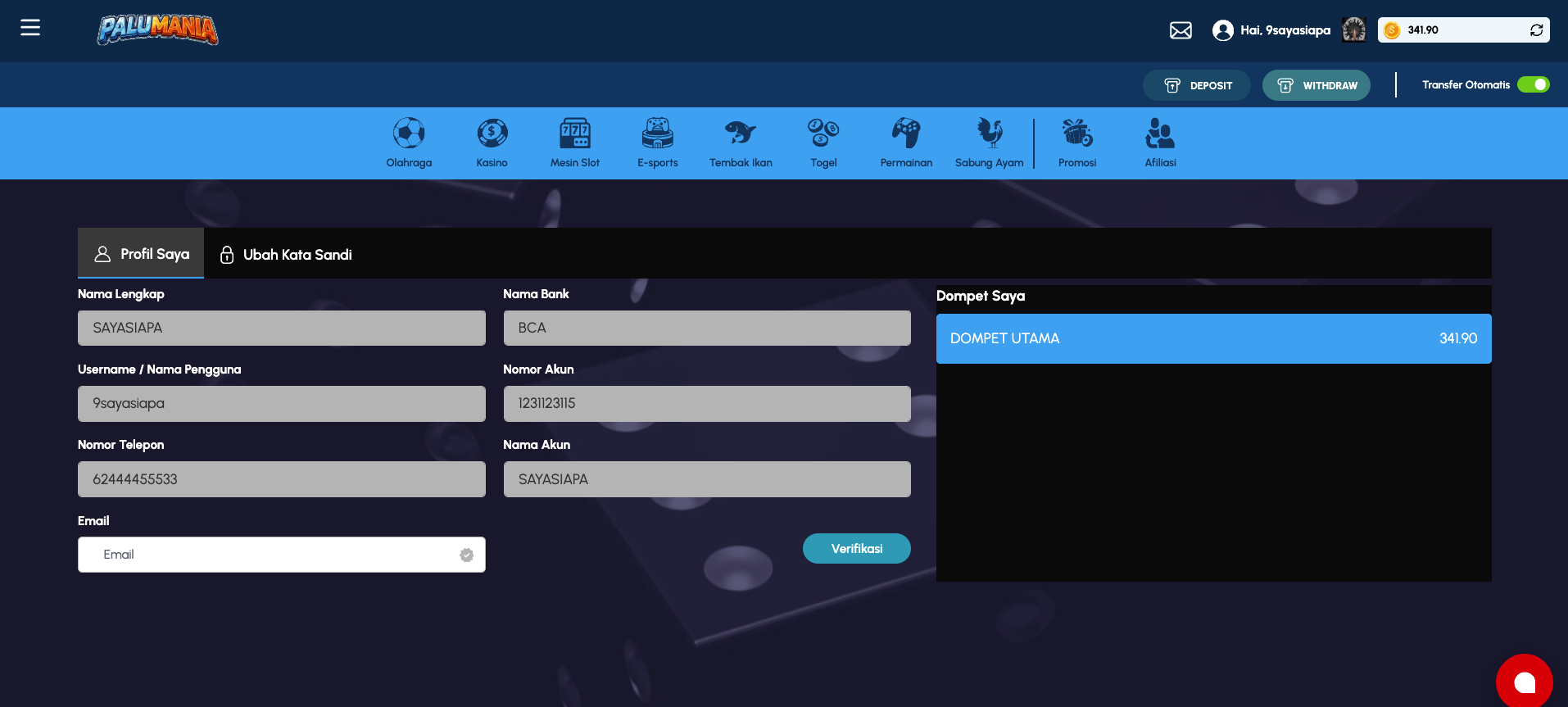 Profile page showing personal information, bank account details, and wallet balance
Page Layout
Header Area
Sama seperti home page - tetap menampilkan header dengan account info, action buttons, dan game category navigation.
Main Content Area - Tabbed Interface
Profile page menggunakan tabbed interface dengan 2 tab:
| Tab Name | Label | Icon | Content |
|---|---|---|---|
| My Profile | Profil Saya | Profile icon | Personal & bank info, wallet display |
| Change Password | Ubah Kata Sandi | Password lock icon | Current & new password fields, save button |
Tab 1: Profil Saya (My Profile)
Personal Information Section
Menampilkan informasi personal pemain - READONLY (tidak dapat diedit).
| Field | Type | Value Type | Editable | Description |
|---|---|---|---|---|
| Nama Lengkap | Text input | String | ❌ No | Full name of player (e.g. "BONUS") |
| Username / Nama Pengguna | Text input | String | ❌ No | Account username (e.g. "200bonus") |
| Nomor Telepon | Text input | Phone number | ❌ No | Phone number associated with account (e.g. "+6212344556") |
| Text input | ✅ Yes | Email address (e.g. "test@test.com") |
Notes:
- Most fields are disabled (read-only) except Email
- Email field may have an edit/verification icon
- All fields are pre-filled with existing account data
- Fields cannot be modified directly in this interface (likely set during registration)
Bank Information Section
Informasi rekening bank untuk withdrawal - mostly READONLY, dengan tombol Verifikasi.
| Field | Type | Value Type | Editable | Description |
|---|---|---|---|---|
| Nama Bank | Text input | String | ❌ No | Bank name (e.g. "BCA") |
| Nomor Akun | Text input | Account number | ❌ No | Bank account number (e.g. "1234567788") |
| Nama Akun | Text input | Name | ❌ No | Account holder name (e.g. "TESTAFFBHTESTAF") |
| Verifikasi Button | Button | Action | - | Button to verify bank account |
Notes:
- All bank fields are disabled (read-only)
- Data is displayed for reference during withdrawal process
- "Verifikasi" (Verify) button verifies the bank account details
- Verification status may update after clicking Verify button
- Bank info likely set during player registration or KYC process
Wallet Section (Dompet Saya)
Menampilkan balance dompet pemain saat ini.
| Element | Type | Description |
|---|---|---|
| Dompet Saya | Heading (h4) | Section title |
| Dompet Utama | Heading (h5) | Main wallet label |
| Balance Amount | Display | Current balance in main wallet (e.g. "2,500.74") in rupiah/coins |
Notes:
- Display only (read-only)
- Shows actual playable balance
- May update in real-time
- Used for player reference
Tab 2: Ubah Kata Sandi (Change Password)
Change Password Form
Form untuk mengubah password akun pemain.
| Field | Type | Placeholder | Required | Description |
|---|---|---|---|---|
| Kata Sandi Saat Ini (Current Password) | Password input | "Ketik kata sandi saat ini (6-16 karakter)" | ✅ Required | Current password untuk verifikasi |
| Kata Sandi Baru (New Password) | Password input | "Ketik kata sandi baru (6-16 karakter)" | ✅ Required | New password to set |
| Konfirmasi Kata Sandi (Confirm Password) | Password input | "Ketik ulang kata sandi baru (6-16 karakter)" | ✅ Required | Confirmation of new password |
Field Features:
- Each field has visibility toggle button (eye icon) to show/hide password
- Fields validate length constraints (6-16 characters)
- Placeholder text shows requirements
- All fields marked with red asterisk (*) indicating required
Save Button
| Element | Type | Label | Action |
|---|---|---|---|
| Simpan | Button | "Simpan" (Save) | Submit form to change password |
Behavior:
- Button submits the form
- Validates all fields are filled
- Validates new password matches confirmation
- Validates new password meets security criteria (6-16 karakter)
- May show success/error toast notification
- Upon success, user may need to re-login
Features
1. View Personal Information
Status: Display mode (read-only)
User Flow:
- Navigate to Profile page
- Tab "Profil Saya" is default selected
- View personal info:
- Full name, username, phone, email
- Bank details (name, account number, account holder name)
- Main wallet balance
Editable Fields:
- None in the display area (all disabled)
- Email may have edit functionality (dependent on UI)
2. Verify Bank Account
Status: Interactive
User Flow:
- Go to Profile page
- In "Profil Saya" tab, scroll to Bank Information section
- Review bank details displayed
- Click "Verifikasi" button
- Platform verifies the bank account details
- Success/error message displayed
Verification Purpose:
- Validate that bank account belongs to player
- Enable withdrawal functionality
- Protect against fraudulent withdrawals
3. Change Password
Status: Interactive form
User Flow:
- Go to Profile page
- Click "Ubah Kata Sandi" tab
- Fill current password (for verification)
- Enter new password
- Confirm new password
- Click "Simpan" button
- Form validates and submits
- Success message or error shown
Validation Rules:
- All fields required
- Password length: 6-16 characters
- New password must match confirmation
- Current password must be correct
- New password must differ from current password
Security Notes:
- Password fields use masking
- Eye toggle allows user to view password before submitting
- Current password required to prevent unauthorized password change
- No password change history or previous passwords visible
4. Wallet Balance Display
Status: Informational
Display:
- Shows current balance in "Dompet Utama"
- Used as reference for deposit/withdrawal limits
- May show multiple wallets if player has them (game wallets, bonus wallets, etc.)
UI Elements Reference
| Component | Type | Tab | Location | Description | Interaction |
|---|---|---|---|---|---|
| Profil Saya Tab | Button/Tab | - | Tab bar | Select "My Profile" tab | Click to view personal info |
| Ubah Kata Sandi Tab | Button/Tab | - | Tab bar | Select "Change Password" tab | Click to view password form |
| Nama Lengkap Input | Text input | Profil Saya | Personal info | Full name display | Read-only |
| Username Input | Text input | Profil Saya | Personal info | Account username display | Read-only |
| Nomor Telepon Input | Text input | Profil Saya | Personal info | Phone number display | Read-only |
| Email Input | Text input | Profil Saya | Personal info | Email address | May be editable |
| Email Icon | Image | Profil Saya | Personal info | Edit/verification status icon | Informational |
| Nama Bank Input | Text input | Profil Saya | Bank info | Bank name display | Read-only |
| Nomor Akun Input | Text input | Profil Saya | Bank info | Account number display | Read-only |
| Nama Akun Input | Text input | Profil Saya | Bank info | Account holder name display | Read-only |
| Verifikasi Button | Button | Profil Saya | Bank info | Bank verification action | Click to verify account |
| Dompet Saya Heading | Heading | Profil Saya | Below bank info | Wallet section title | Informational |
| Dompet Utama Label | Heading | Profil Saya | Wallet section | Main wallet label | Informational |
| Balance Display | Text | Profil Saya | Wallet section | Current balance amount | Informational |
| Current Password Input | Password input | Ubah Kata Sandi | Password form | Enter current password | Required field, toggle visibility |
| Current Password Toggle | Button | Ubah Kata Sandi | Password field | Show/hide current password | Click eye icon |
| New Password Input | Password input | Ubah Kata Sandi | Password form | Enter new password | Required field, toggle visibility |
| New Password Toggle | Button | Ubah Kata Sandi | Password field | Show/hide new password | Click eye icon |
| Confirm Password Input | Password input | Ubah Kata Sandi | Password form | Confirm new password | Required field, toggle visibility |
| Confirm Password Toggle | Button | Ubah Kata Sandi | Password field | Show/hide confirm password | Click eye icon |
| Simpan Button | Button | Ubah Kata Sandi | Password form footer | Submit password change | Click to save |
Validation Rules
Personal Information (Profil Saya)
- All fields are read-only except possibly Email
- No validation needed - display only
Bank Information
- Nama Bank: Display only, from predefined list
- Nomor Akun: 7-17 digits (typical bank account format)
- Nama Akun: Capital letters only, 3-50 characters
Change Password (Ubah Kata Sandi)
| Field | Rule | Error Message |
|---|---|---|
| Kata Sandi Saat Ini | Required, 6-16 chars, must be correct | "Password is incorrect" or "Required field" |
| Kata Sandi Baru | Required, 6-16 chars, != current password | "Required field" / "Must be 6-16 characters" / "Cannot use previous password" |
| Konfirmasi Kata Sandi | Required, must match "Kata Sandi Baru" | "Passwords do not match" |
Data Displayed
Personal Information
Source: User account data from authentication/player profile API
Fields:
- Nama Lengkap: From player registration
- Username: From account creation
- Nomor Telepon: From account or KYC data
- Email: From account settings
- Updated: Real-time or after account changes
Bank Information
Source: Player bank account verification API / KYC data
Fields:
- Nama Bank: Predefined list (BCA, Mandiri, BNI, etc.)
- Nomor Akun: User-provided during registration
- Nama Akun: User-provided during registration
- Verification Status: From verification process
Wallet Balance
Source: Player wallet / balance API (e.g. /api/player/balance or /api/wallet/main)
Fields:
- Dompet Utama balance: Current playable balance in rupiah/coins
- Real-time or near real-time updates
- May be cached (updated on page load or interval)
Behavior & Interactions
On Page Load
- Page navigates to Profile
- Default tab is "Profil Saya"
- Fetch personal information from API
- Fetch bank information from API
- Fetch wallet balance from API
- Display all information in read-only format
Tab Switching
- Clicking "Profil Saya" tab: Shows personal & bank info, wallet balance
- Clicking "Ubah Kata Sandi" tab: Shows password change form
Verifying Bank Account
- User clicks "Verifikasi" button
- Modal or confirmation might appear
- System validates bank account details
- Success/error message displayed
- Verification status updates
Changing Password
- User enters current password
- User enters new password
- User confirms new password (matches must match)
- User clicks "Simpan" button
- Form validates all rules
- If valid, send to API
/api/account/change-passwordor similar - If success, show toast: "Kata sandi berhasil diubah" (Password changed successfully)
- User may be logged out and need to re-login with new password
- If error, show error message (e.g. Current password incorrect, password too weak, etc.)
Visibility Toggle (Password Fields)
- User clicks eye icon next to password field
- Password text becomes visible (shows actual characters)
- Eye icon changes appearance (filled vs unfilled)
- User can toggle back to mask password
Edge Cases & Error States
Email Field
- If editable: May require verification email sent
- If read-only: May show unverified status
Bank Verification
- If already verified: "Verifikasi" button may be disabled or show "Verified" status
- If not verified: Button is active, user can click to initiate verification
- Verification may require OTP or email confirmation
Password Change Errors
- Current password incorrect: "Kata sandi saat ini salah" (Current password incorrect)
- Passwords don't match: "Konfirmasi kata sandi tidak sesuai" (Confirmation doesn't match)
- Password too weak: "Kata sandi tidak memenuhi kriteria keamanan" (Password doesn't meet security criteria)
- Password same as current: "Kata sandi baru tidak boleh sama dengan kata sandi sebelumnya" (New password must differ from current)
Loading States
- Page load: May show skeleton loaders for sections while API data fetches
- Bank verification: May show loading spinner while verifying
- Password change: May show loading state on Simpan button while submitting
Mobile Responsiveness
- Tabbed interface adapts to mobile screen width
- Input fields stack vertically
- Buttons adjust size/spacing for touch targets
- Password toggle buttons size appropriately for mobile
Notes
- Most personal information is immutable after account creation
- Email may be editable depending on platform requirements
- Bank information is critical for withdrawal feature - verification needed
- Password change is security-sensitive operation
- Session may expire during long idle periods - user must re-authenticate
- Placeholder text provides helpful guidance on password requirements
- All password inputs use masking for security
- Eyeball toggle icon provides convenience for password verification before submit