Moneysite — Deposit
Overview
Halaman Deposit adalah tempat dimana pemain dapat melakukan transaksi penambahan balance akun. Halaman ini menyediakan berbagai metode pembayaran untuk kemudahan pemain:
- Transfer Bank (Direct bank transfer)
- QR Code (QRIS/Dynamic QR Code payment)
- Rekening Virtual (Virtual account number)
- E-Wallet (Digital wallet services)
- Pulsa (Mobile credit transfer)
Setiap metode memiliki nilai minimum/maksimum, biaya administrasi, dan instruksi berbeda.
Screenshot

Deposit page showing Transfer Bank payment method with form fields and quick amount buttons
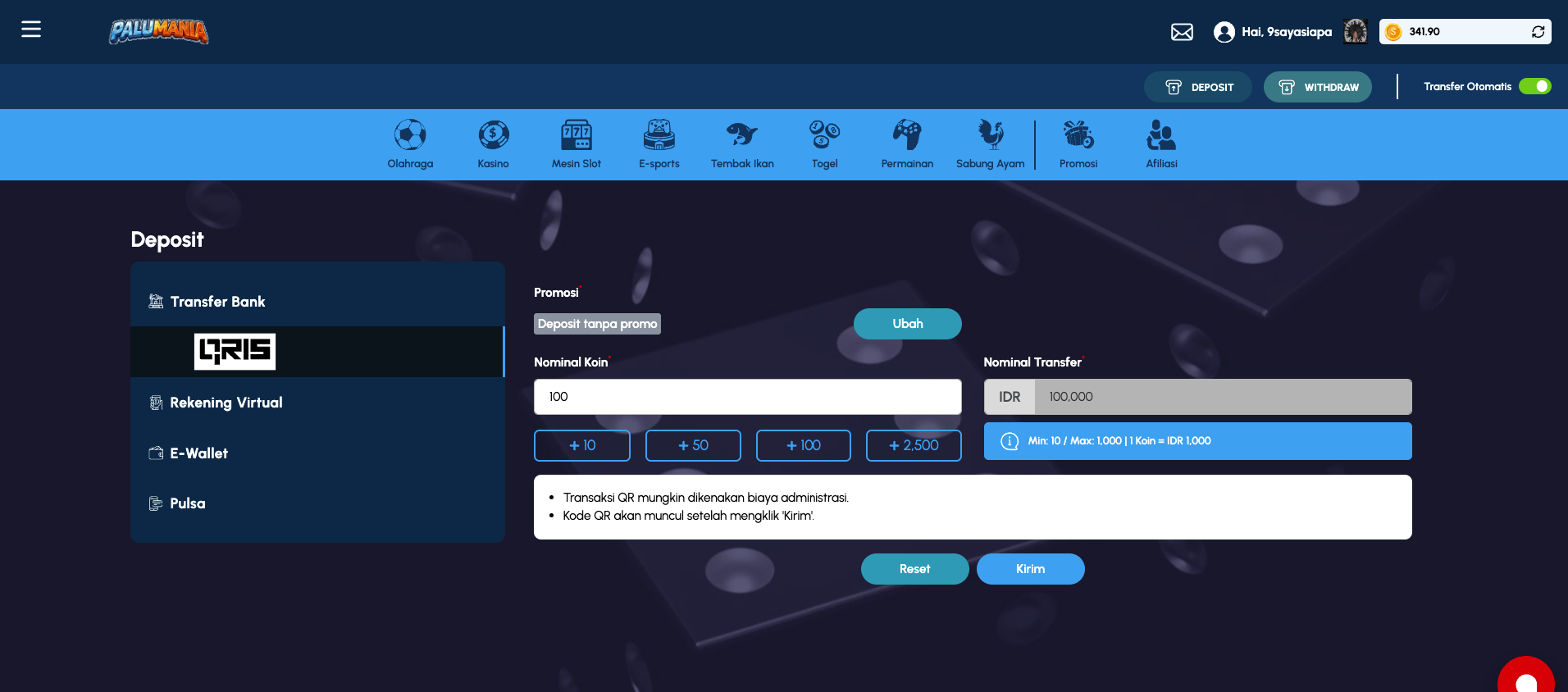
Deposit page showing QR Code payment method with amount selection
Access
- URL:
/deposit - Role required: Authenticated player
- Navigation path: Click "Deposit" button in action bar (always visible at top)
- Direct link: Accessible from any page in the platform
Page Layout
Header Area
Sama seperti home page - tetap menampilkan header dengan account info, action buttons, dan game category navigation.
Main Content Area - Tabbed Payment Methods
Deposit page menggunakan tabbed interface dengan 5 tab payment methods:
| Tab # | Name | Icon | Code | Description |
|---|---|---|---|---|
| 1 | Transfer Bank | Bank icon | transfer-bank-tab | Direct bank transfer |
| 2 | QR Code/QRIS | QR icon | deposit-qr-tab | QR code payment (automatically generated) |
| 3 | Rekening Virtual | Virtual account icon | N/A | Virtual account number provided |
| 4 | E-Wallet | Wallet icon | N/A | Digital wallet services (OVO, Dana, GCash, etc) |
| 5 | Pulsa | Mobile phone icon | N/A | Mobile credit/pulsa transfer |
Tab Details
Tab 1: Transfer Bank (Direct Bank Transfer)
Form Fields
| Field | Type | Required | Default | Description |
|---|---|---|---|---|
| Promosi (Promotion) | Dropdown | ✅ Required | "Deposit tanpa promo" | Select promotional offer to apply |
| Transfer Bank (Transfer Bank) | Dropdown combobox | ✅ Required | "Pilih" (Select) | Select source bank (bank asal) |
| Tujuan (Destination) | Dropdown combobox | ✅ Required | "Pilih" (Select) | Select destination bank account |
| Nominal Koin (Coin Amount) | Number input | ✅ Required | "0" | Enter amount in coins |
| Quick Amount Buttons | Buttons (4x) | - | - | Quick select: 10, 50, 100, 2,500 coins |
| Nominal Transfer (Transfer Amount) | Text input (readonly) | - | "0" | Auto-calculated IDR amount (disabled) |
| Catatan (Notes) | Text area | - | - | Optional notes for transaction |
Additional Elements
- Currency Display: "IDR" label before Nominal Transfer field
- Info Text: "Min: X / Max: Y | 1 Koin = IDR 1,000" (shows transaction limits)
- Change Promotion Button: "Ubah" button to modify selected promotion
Action Buttons
- Reset: Clear all form fields
- Kirim: Submit deposit request
Tab 2: QR Code / QRIS Payment
Form Fields
| Field | Type | Required | Default | Description |
|---|---|---|---|---|
| Promosi (Promotion) | Dropdown | ✅ Required | "Deposit tanpa promo" | Select promotional offer |
| Nominal Koin (Coin Amount) | Number input | ✅ Required | "0" | Enter amount in coins |
| Quick Amount Buttons | Buttons (4x) | - | - | Quick select: 10, 50, 100, 2,500 coins |
| Nominal Transfer (Transfer Amount) | Text input (readonly) | - | "0" | Auto-calculated IDR amount (disabled) |
Additional Elements
- Currency Display: "IDR" label before Nominal Transfer field
- Info Text: "Min: 10 / Max: 1,000 | 1 Koin = IDR 1,000"
- Important Notes (List):
- "Transaksi QR mungkin dikenakan biaya administrasi." (QR transactions may have admin fees)
- "Kode QR akan muncul setelah mengklik 'Kirim'." (QR code will appear after clicking Send)
Action Buttons
- Reset: Clear form fields
- Kirim: Generate QR code for payment
Post-Submit Behavior
- After clicking "Kirim", a QR code is displayed
- User scans QR code with payment app (GCash, Alipay, etc.)
- Transaction completes after user scans and pays
Tab 3: Rekening Virtual (Virtual Account)
Form Fields
| Field | Type | Required | Default | Description |
|---|---|---|---|---|
| Promosi (Promotion) | Dropdown | ✅ Required | "Deposit tanpa promo" | Select promotional offer |
| Transfer Bank (Transfer Bank) | Dropdown combobox | ✅ Required | "Pilih" (Select) | Select which bank to transfer FROM (user's bank) |
| Nominal Koin (Coin Amount) | Number input | ✅ Required | "0" | Enter amount in coins |
| Quick Amount Buttons | Buttons (4x) | - | - | Quick select: 10, 50, 100, 2,500 coins |
| Nominal Transfer (Transfer Amount) | Text input (readonly) | - | "0" | Auto-calculated IDR amount (disabled) |
Additional Elements
- Currency Display: "IDR" label before Nominal Transfer field
- Info Text: "Min: 10 / Max: 100,000 | 1 Koin = IDR 1,000"
- Important Notes (List):
- "Transaksi Rekening Virtual mungkin dikenakan biaya administrasi." (Virtual account transactions may have admin fees)
- "Kode pembayaran akan muncul setelah mengklik 'Kirim'" (Payment code will appear after clicking Send)
- "Tidak disarankan untuk membayar melalui bank lain agar transaksi dapat diproses tanpa masalah" (Not recommended to pay from other banks)
Action Buttons
- Reset: Clear form fields
- Kirim: Generate virtual account and payment code
Post-Submit Behavior
- After clicking "Kirim", a virtual account number and payment code displays
- User transfers money from their bank to the provided virtual account
- Transaction auto-confirms when payment received
Tab 4: E-Wallet
Form Fields
| Field | Type | Required | Default | Description |
|---|---|---|---|---|
| Promosi (Promotion) | Dropdown | ✅ Required | "Deposit tanpa promo" | Select promotional offer |
| Provider E-Wallet (E-Wallet Provider) | Dropdown combobox | ✅ Required | "Pilih" (Select) | Select e-wallet provider (GCash, OVO, Dana, etc.) |
| Tujuan (Destination) | Dropdown combobox | ✅ Required | "Pilih" (Select) | Select destination wallet account |
| Nominal Koin (Coin Amount) | Number input | ✅ Required | "0" | Enter amount in coins |
| Quick Amount Buttons | Buttons (4x) | - | - | Quick select: 10, 50, 100, 2,500 coins |
| Nominal Transfer (Transfer Amount) | Text input (readonly) | - | "0" | Auto-calculated IDR amount (disabled) |
| Catatan (Notes) | Text area | - | - | Optional notes for transaction |
Additional Elements
- Currency Display: "IDR" label before Nominal Transfer field
- Info Text: "Min: 0 / Max: 0 | 1 Koin = IDR 1,000" (limits may be provider-dependent)
- Change Promotion Button: "Ubah" to modify promotion
Action Buttons
- Reset: Clear form fields
- Kirim: Submit e-wallet deposit
Post-Submit Behavior
- After clicking "Kirim", redirected to e-wallet provider payment gateway
- User confirms payment in e-wallet app or website
- Callback confirms transaction completion
Tab 5: Pulsa (Mobile Credit)
Form Fields
| Field | Type | Required | Default | Description |
|---|---|---|---|---|
| Promosi (Promotion) | Dropdown | ✅ Required | "Deposit tanpa promo" | Select promotional offer |
| Provider Pulsa (Mobile Provider) | Dropdown combobox | ✅ Required | "Pilih" (Select) | Select mobile provider (Telkomsel, Indosat, XL Axiata, etc.) |
| Tujuan (Destination) | Dropdown combobox | ✅ Required | "Pilih" (Select) | Select destination phone number |
| Nominal Koin (Coin Amount) | Number input | ✅ Required | "0" | Enter amount in coins |
| Quick Amount Buttons | Buttons (4x) | - | - | Quick select: 10, 50, 100, 2,500 coins |
| Nominal Transfer (Transfer Amount) | Text input (readonly) | - | "0" | Auto-calculated IDR amount (disabled) |
| Catatan (Notes) | Text area | - | - | Optional notes for transaction |
Additional Elements
- Currency Display: "IDR" label before Nominal Transfer field
- Info Text: "Min: 0 / Max: 0 | 1 Koin = IDR 1,000"
- Change Promotion Button: "Ubah" to modify promotion
Action Buttons
- Reset: Clear form fields
- Kirim: Submit pulsa deposit
Post-Submit Behavior
- After clicking "Kirim", system processes pulsa transfer
- Mobile credit deducted from user's phone number
- Confirmation sent via SMS or in-game notification
Features
1. Multiple Payment Methods
Status: Tabbed interface with 5 options
Payment Methods:
- Transfer Bank - Direct bank-to-bank transfer (most common in Indonesia)
- QR Code - Modern payment via QRIS/dynamic QR codes
- Rekening Virtual - Virtual account provided by platform
- E-Wallet - Digital wallet services (GCash, OVO, Dana, LinkAja, etc.)
- Pulsa - Mobile credit transfer from phone balance
Selection Criteria:
- Bank transfer: For users with bank accounts
- QR Code: For users with mobile payment app supporting QRIS
- Virtual Account: For any bank (auto-matched upon payment)
- E-Wallet: For users with digital wallet accounts
- Pulsa: For users wanting to pay with mobile credit
2. Dynamic Amount Calculation
Status: Real-time, automatic
Calculation Logic:
- User enters amount in Koin (coins)
- System automatically calculates IDR amount:
Nominal Koin × 1,000 = Nominal Transfer - Formula: 1 Koin = IDR 1,000 (fixed conversion rate)
- Quick buttons (10, 50, 100, 2,500) auto-populate the coin field
Example:
- User enters: 50 coins
- System calculates: 50 × 1,000 = IDR 50,000
3. Transaction Limits
Status: Per payment method
Limits by Method:
| Method | Min | Max |
|---|---|---|
| Transfer Bank | 0 | 0 (likely unlimited or very high) |
| QR Code | 10 | 1,000 coins |
| Rekening Virtual | 10 | 100,000 coins |
| E-Wallet | 0 | 0 (provider-dependent) |
| Pulsa | 0 | 0 (provider-dependent) |
Admin Fees:
- Each method may have associated admin fees (mentioned in notes)
- Fees may vary by provider or amount
- Fees typically deducted from transferred amount
4. Promotion Selection
Status: Dropdown selector on all methods
Default: "Deposit tanpa promo" (Deposit without promo)
Available Promotions:
- User can click "Ubah" (Change) button to select different promotion
- Promotions may include:
- Bonus coins/percentage
- Cashback
- Free spins
- etc.
Promotion Effect:
- Applied upon successful deposit
- Bonus added to account automatically
5. Provider/Bank Selection
Status: Dropdown combobox
Transfer Bank Tab:
- Transfer Bank dropdown: Select source bank (user's bank)
- Tujuan dropdown: Select destination account (platform's receiving account)
E-Wallet Tab:
- Provider E-Wallet dropdown: Select digital wallet type (GCash, OVO, Dana, etc.)
- Tujuan dropdown: Select specific wallet account to transfer to
Pulsa Tab:
- Provider Pulsa dropdown: Select mobile provider (Telkomsel, Indosat, XL, etc.)
- Tujuan dropdown: Select phone number to transfer pulsa from
Behavior:
- Dropdowns are combo searchable (can type to filter)
- Some dropdowns are dependent on previous selection (disabled until parent selected)
6. Transaction Notes
Status: Optional text area (some methods)
Available on:
- Transfer Bank
- E-Wallet
- Pulsa
Purpose:
- User can add memo/notes for transaction
- Helpful for tracking multiple deposits
- Reference for customer support if needed
Workflow
Typical Deposit Flow (Transfer Bank Example)
- User navigates to Deposit page → View "Transfer Bank" tab (default)
- Select promotion → Click dropdown, choose promotion option
- Select source bank → Click "Transfer Bank" dropdown, find user's bank
- Select destination account → Click "Tujuan" dropdown, select platform's receiving account
- Enter amount → Type in "Nominal Koin" field OR click quick button (10/50/100/2,500)
- System auto-calculates → IDR amount appears in "Nominal Transfer" field
- Add notes (optional) → Type in "Catatan" field if desired
- Review and submit → Click "Kirim" button
- Get transfer instructions → Platform displays bank details, reference number, amount
- User transfers money → User initiates bank transfer with provided details
- Confirmation → Platform auto-confirms when payment received (may take minutes to hours)
- Coins arrive → Balance updated in account + promotion bonus applied
QR Code Deposit Flow
- Navigate to Deposit → Select "QR Code" tab
- Select promotion
- Enter coin amount (click quick button or type)
- Click "Kirim"
- QR code displays on screen
- User opens payment app (GCash, Alipay, etc.)
- User scans QR code
- User confirms payment in app
- Payment settled immediately or within seconds
- Coins arrive in account
Virtual Account Flow
- Navigate → Select "Rekening Virtual" tab
- Select promotion
- Select source bank
- Enter amount
- Click "Kirim"
- Virtual account number displays (e.g. 1231000123456)
- User transfers from their bank to virtual account
- Auto-confirmation upon receipt
- Coins credited to account
UI Elements Reference
| Component | Type | Tab(s) | Location | Description | Interactive |
|---|---|---|---|---|---|
| Tab: Transfer Bank | Tab button | - | Tab bar | Bank transfer method | Click to select |
| Tab: QR Code | Tab button | - | Tab bar | QR code payment | Click to select |
| Tab: Rekening Virtual | Tab button | - | Tab bar | Virtual account | Click to select |
| Tab: E-Wallet | Tab button | - | Tab bar | Digital wallet | Click to select |
| Tab: Pulsa | Tab button | - | Tab bar | Mobile credit | Click to select |
| Promosi Dropdown | Combobox | All | Form | Promotion selector | Click, type to search |
| Ubah Button | Button | All (in Promosi) | Form | Change promotion | Click to change |
| Transfer Bank Dropdown | Combobox | Bank, Virtual | Form | Source bank | Click, type to search |
| Provider E-Wallet Dropdown | Combobox | E-Wallet | Form | Select e-wallet | Click, type to search |
| Provider Pulsa Dropdown | Combobox | Pulsa | Form | Select mobile provider | Click, type to search |
| Tujuan Dropdown | Combobox | Bank, Virtual, E-Wallet, Pulsa | Form | Destination account | Click, type to search |
| Nominal Koin Input | Number input | All | Form | Amount in coins | Type or click quick buttons |
| Coin Quick Buttons | Buttons (4x) | All | Form | 10, 50, 100, 2,500 | Click to auto-fill |
| Nominal Transfer Display | Text input (readonly) | All | Form | Auto-calculated IDR | Read-only, no interaction |
| Catatan Text Area | Text area | Bank, E-Wallet, Pulsa | Form | Optional notes | Type to add notes |
| Info Text | Display | All | Form | Min/Max/Fee info | Informational |
| Reset Button | Button | All | Form footer | Clear all fields | Click to reset |
| Kirim Button | Button | All | Form footer | Submit deposit | Click to process |
| Recently Played Section | Section | All | Below form | Game carousel | Scroll, click play |
Validation Rules
All Methods
| Field | Validation Rule | Error Message |
|---|---|---|
| Promosi | Required (auto-filled with default) | "Please select a promotion" |
| Nominal Koin | Required, minimum 1, numeric only | "Amount must be greater than 0" |
| Nominal Koin | Must be >= Method Min | "Amount below minimum (" + min + ")" |
| Nominal Koin | Must be <= Method Max | "Amount exceeds maximum (" + max + ")" |
Transfer Bank & Virtual Account
| Field | Validation | Error |
|---|---|---|
| Transfer Bank (source) | Required | "Please select source bank" |
| Tujuan (destination) | Required | "Please select destination account" |
E-Wallet & Pulsa
| Field | Validation | Error |
|---|---|---|
| Provider | Required | "Please select provider" |
| Tujuan (account) | Required | "Please select destination account" |
Optional Fields
| Field | Validation | Error |
|---|---|---|
| Catatan (Notes) | Optional, max 500 chars | "Notes exceeds 500 characters" |
Data Displayed
Post-Submission (Transaction Details)
After user clicks "Kirim", the system displays transaction-specific information:
Transfer Bank:
- Bank destination name
- Account number (masked)
- Account holder name
- Exact transfer amount (IDR)
- Reference number / deposit code
- Valid until time limit
QR Code:
- QR code image
- Merchant/platform name
- Amount in rupiah
- Reference/transaction ID
Rekening Virtual:
- Virtual account number
- Receiving bank
- Amount
- Valid transfer period
- Reference code
E-Wallet:
- Payment gateway redirects to e-wallet app/website
- Amount and merchant details shown by provider
Pulsa:
- Confirmation dialog with phone number
- Amount to be transferred
- Provider confirmation SMS sent
Edge Cases & Error States
Invalid Input
- Amount = 0: "Jumlah transfer minimal 1 koin" (Minimum 1 coin)
- Amount < Min: "Nominal transfer di bawah batas minimum"
- Amount > Max: "Nominal transfer melebihi batas maksimal"
- Non-numeric: Form rejects non-numeric input
Dropdown Errors
- Bank not selected: "Silakan pilih bank terlebih dahulu"
- Destination not available: Tujuan dropdown disabled until valid source selected
Network/Processing Errors
- Payment gateway timeout: "Terjadi kesalahan, silakan coba lagi"
- Invalid promotion: "Promosi tidak tersedia"
- System maintenance: "Sistem sedang dalam pemeliharaan"
Transaction Limits
- Daily limit reached: "Batas deposit harian telah tercapai"
- Account VIP limit: Based on player VIP level
Admin Fees
- Fee calculation: Each method may deduct fees from final amount
- User notification: Fee info shown in "Info Text" section
- Fee deducted from: Usually from the IDR amount (not coin amount)
Mobile Responsiveness
- Tabbed interface displays all tabs (may scroll horizontally on small screens)
- Form fields stack vertically on mobile
- Quick amount buttons fit in single row or wrap to 2 rows
- Textareas resize to fit mobile keyboard
- Recent games section scrolls horizontally
Security & Compliance
- PCI Compliance: Bank transfer uses secure channels
- Payment Gateway: Third-party providers ensure security
- Transaction verification: Reference numbers and codes prevent fraud
- TLS Encryption: All transactions use SSL/TLS
- KYC/AML: User verification may be required for large deposits
- Fraud Prevention: Limits and blacklisting for suspicious activity
Notes
- Conversion Rate: Fixed at 1 Koin = IDR 1,000 across all methods
- Processing Time:
- Bank transfer: 1-24 hours (depending on banks)
- QR/QRIS: Instant to 1 minute
- Virtual account: Immediate upon receipt
- E-Wallet: Instant to 5 minutes
- Pulsa: 1-5 minutes
- Promotion Stacking: May not be allowed on certain promotions
- Admin Fees: Typically 1-3% per transaction
- Failed Transactions: Reversed within 1-3 business days
- Multiple Accounts: One player cannot have multiple active deposits simultaneously
- Currency: All transactions in Indonesian Rupiah (IDR)
- Language: Interface in Bahasa Indonesia